Unordered List

Become Part of Our Smart Readers Community and Enjoy Free updates directly to your Inbox. (No Spam,No virus , We Promise) NEED ANY HELP OR DOUBT ABOUT THIS WEBSITE CONTACT EMAIL - ANEESHVAKKOM@GMAIL.COM. PHONE NUMBER 00971554588460 OR LEAVE A MESSAGE LEFT CHATROOM (ASK ANEESH) THANKS FOR THE VICIT

Friday, 29 August 2014

ഒരു Android ഫോണില്‍ രണ്ടു വ്യത്യസ്ഥ WhatsAPP അക്കൗണ്ടുകള്‍ ഉണ്ടാക്കാം!!!


ഇന്നത്തെ കാലഘട്ടത്തിലെ ഏറ്റവും ജനപ്രിയമായ ചാറ്റിങ് സംവിധാനമാണല്ലോ WhatsAPP. സാധാരണയായി ഫോണില്‍ ഡ്യുവല്‍ സിം ഉണ്ടെങ്കില്‍ പോലും രണ്ടു WhatsAPP അക്കൗണ്ടുകള്‍ രണ്ടു നമ്പറില്‍ ഉപയോഗിക്കാന്‍ കഴിയാറില്ല (WhatsAPP കമ്പനി ഇത് അനുവദിക്കുന്നില്ല എന്നതാണ് സത്യം). എന്നാല്‍ ഇതിനൊരു പരിഹാരമാണ് OGWhatsApp. ഈ അപ്ലിക്കേഷന്‍ ഉപയോഗിച്ചു നമുക്ക് ഒരു ഫോണില്‍ രണ്ടു വ്യത്യസ്ഥ  WhatsAPP അക്കൗണ്ടുകള്‍ ഒരേ സമയം ഉപയോഗിക്കാം, പക്ഷെ ഫോണ്‍ android ആയിരിക്കണം എന്ന് മാത്രം. നിങ്ങളുടെ ഫോണ്‍ റൂട്ട് ചെയ്യേണ്ട ആവശ്യവുമില്ല. ഇതെങ്ങനെ ചെയ്യണം എന്ന് താഴെ വിവരിക്കാം. ഓരോരുത്തരുടെ ഫോണ്‍ മോഡലും, WhatsAPP വേര്‍ഷനും അനുസരിച്ച് അപൂര്‍വ്വം ചില സന്ദര്‍ഭങ്ങളില്‍ ഇതു പ്രവര്‍ത്തിക്കില്ല എന്ന് ആദ്യമേ പറയട്ടെ. ഓരോ സ്റ്റെപ്പും ശ്രദ്ധിച്ചു വായിച്ചു നോക്കി ചെയ്തു നോക്കുക.
1. ആദ്യം നോക്കേണ്ടത് നിങ്ങളുടെ ഒരു android ഡ്യുവല്‍ സിം ഫോണ്‍ ആണോ എന്നതാണ്. ആണെങ്കില്‍ മാത്രം ഇതിനു മിനക്കെട്ടാല്‍ മതി കേട്ടോ. കൂടാതെ രണ്ടിലും സിം കാര്‍ഡ്‌ ഇട്ടിരിക്കണം.
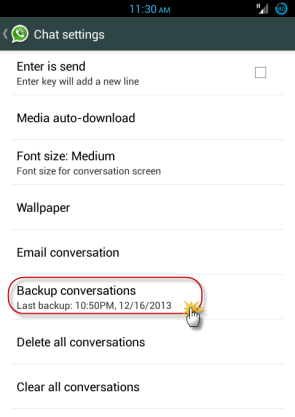
2. ഇനി നിങ്ങളുടെ ഫോണില്‍ ഇപ്പോള്‍ ഉള്ള WhatsAPP ഓപ്പണ്‍ ചെയ്തു ഡാറ്റ ബാക്ക്അപ്പ്‌ ചെയ്യുക. ഇതിനായി Settings >> Chat Settings >> Backup Conversations ക്ലിക്ക് ചെയ്താല്‍ മതി.

 3. അടുത്തതായി ഫോണിലെ എല്ലാ Whatsapp ഡാറ്റയും ക്ലിയര്‍ ചെയ്യുക. ഇതിനായി Settings >> Applications >> Whatsapp >> Clear Data അടിക്കുക.

 4. ഇനി ഫയല്‍മാനേജര്‍ ഓപ്പണ്‍ ചെയ്തു SD കാര്‍ഡില്‍ ‘WhatsApp’ എന്ന ഫോള്‍ഡര്‍ കണ്ടുപിടിക്കുക. SD കാര്‍ഡ്‌ ഇല്ലാത്ത ഫോണ്‍ ആണെങ്കില്‍ internal മെമ്മറിയില്‍ ഈ ഫോള്‍ഡര്‍ കണ്ടെത്താനാകും. ഇനി താഴെ കാണുന്നതു പോലെ  ‘WhatsApp’ എന്ന ഈ ഫോള്‍ഡറിന്‍റെ പേര് മാറ്റി  ‘OGWhatsApp’ എന്നാക്കുക (റിനെയിം ചെയ്യുക).


5. ഇനി നിങ്ങളുടെ ഫോണിലുള്ള ഒറിജിനല്‍ WhatsApp അണ്‍ഇന്‍സ്റ്റോള്‍ ചെയ്യുക.
6. അതു കഴിഞ്ഞാല്‍ OGWhatsapp നിങ്ങളുടെ ഫോണില്‍ ഡൌണ്‍ലോഡ് ചെയ്യുക. ഡൌണ്‍ലോഡ് ചെയ്യാന്‍ ഈ ലിങ്കില്‍ പോകുക. (ആദ്യമേ പറയട്ടെ ഇതില്‍ നിങ്ങള്‍ ക്ലിക്ക് ചെയ്താല്‍ ആദ്യമെത്തുന്നത് ഒരു പരസ്യ പേജിലേക്കായിരിക്കും. ആ പേജില്‍ ഏറ്റവും മുകളില്‍ വലതു വശത്ത് ‘SKIP THIS AD’ ക്ലിക്ക് ചെയ്യുക, ചിലപ്പോള്‍ ഒരു നമ്പര്‍ എന്റര്‍ ചെയ്യാന്‍ പറയും. തുടര്‍ന്നു വരുന്നതാണ് നമ്മുടെ ഡൌണ്‍ലോഡിംഗ് പേജ്. ആ പേജില്‍ താഴെയായി കുറെ ഡൌണ്‍ലോഡിംഗ് ലിങ്കുകള്‍ കാണാനാകും. ഇതില്‍ ആദ്യത്തെ ലിങ്കില്‍ ക്ലിക്ക് ചെയ്യരുത്. അത് ഒറിജിനല്‍ Whatsapp ലിങ്ക് ആണ്. തുടര്‍ന്ന് വരുന്നതാണ് OGWhatsapp ഡൌണ്‍ലോഡിംഗ് ലിങ്കുകള്‍. ഇതില്‍ ക്ലിക്ക് ചെയ്യുക. ഒന്ന് വര്‍ക്ക് ചെയ്യുന്നില്ലെങ്കില്‍ അടുത്തത് നോക്കുക). ഇനി ഇവിടെ ക്ലിക്ക് ചെയ്തോളൂ Download OGWhatsapp
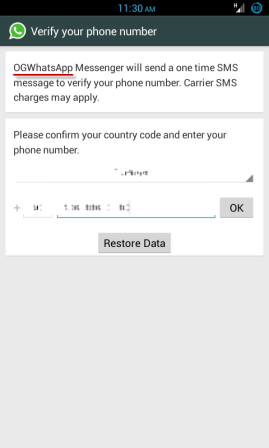
7. ഇനി OGWhatsapp നിങ്ങളുടെ ഫോണില്‍ ഇന്‍സ്റ്റാള്‍ ചെയ്യുക. തുടര്‍ന്ന് ഇത് ആക്റ്റിവേറ്റ് ചെയ്യുക.ഓര്‍ക്കുക ഇത് വെരിഫൈ ചെയ്യുമ്പോള്‍ നിങ്ങള്‍ നല്‍കേണ്ടത് നേരത്തെ നിങ്ങള്‍ ഒറിജിനല്‍ Whatsapp ല്‍ ഉപയോഗിച്ചിരുന്ന പഴയ  നമ്പര്‍ ആയിരിക്കണം.

8. ആക്റ്റിവേറ്റ് ചെയ്തു കഴിഞ്ഞാല്‍  OGWhatsapp ല്‍ മുമ്പ് നിങ്ങളുടെ ഒറിജിനല്‍ Whatsapp ല്‍ ഉണ്ടായിരുന്ന എല്ലാ ഡാറ്റയും കാണാനാകും.
9. ഇനി പ്ലേസ്റ്റോറില്‍ പോയോ അല്ലെങ്ങില്‍ ഇവിടെ ക്ലിക്ക് ചെയ്തോ ഒറിജിനല്‍ Whatsapp വീണ്ടും ഡൌണ്‍ലോഡ് ചെയ്തു ഇന്‍സ്റ്റാള്‍ ചെയ്യുക. ഓര്‍ക്കുക ഇത് ആക്റ്റിവേറ്റ് ചെയ്യുമ്പോള്‍ നല്‍കേണ്ടത് നിങ്ങളുടെ രണ്ടാമത്തെ നമ്പര്‍ ആയിരിക്കണം. ഇത്രയും മതി, ഇനി മുതല്‍ നിങ്ങള്‍ക്കു രണ്ടു Whatsapp ഉം ഒരേ സമയം ഉപയോഗിക്കാം. കൂട്ടുകാരേ ഇഷ്ട്ടപ്പെട്ടാല്‍ ഷെയര്‍ ചെയ്യാന്‍ മറക്കല്ലേ…ഇത് പോലുള്ള കൂടുതല്‍ ടിപ്സുകള്‍ ലഭ്യമാകാന്‍ ഈ പേജ് ലൈക്‌ ചെയ്യൂ ANEESHVAKKOM

Friday, 13 June 2014

fifa worldcup 2014 watch online in pc nd mobile


ഇനിയുള്ള ദിവസങ്ങള്‍ ലോകം മുഴുവന്‍ മിനിസ്ക്രീനിലേക്ക് കണ്ണും നട്ടിരിക്കുന്ന കാലമാണ്. ഫിഫ വേള്‍ഡ് കപ്പിനായി ലോകം മഴുവന്‍ കാത്തിരിക്കുന്നു. പ്രമുഖമായ ഏതെങ്കിലും സ്പോര്‍ട്സ് ചാനലിലാവും കളി കാണാനാവുക. വീട്ടിലിരുന്ന് ടിവി കാണാന്‍ സാധിക്കാത്ത കാല്‍പന്ത് കളിപ്രേമികള്‍ക്ക് കളി കാണാന്‍ മറ്റൊരു മാര്‍ഗ്ഗം ഓണ്‍ലൈനാണ്. കളികാണാനുള്ള വിവിധ ഓണ്‍ലൈന്‍ മാര്‍ഗ്ഗങ്ങളാണ് ഇവിടെ പറയുന്നത്.
ESPN
ഇഎസ് പി എന്നിലാണ് കളി സംപ്രേഷണം ചെയ്യുക. എന്നാല്‍ അതേ സമയം എല്ലാ കളികളും ചാനലിന് പുറമേ സ്ട്രീം ചെയ്യുന്നുമുണ്ട്. ടാബ്ലറ്റ്, ഫോണ്‍ എന്നിവയില്‍ ആപ്ലിക്കേഷന്‍ ഇന്‍സ്റ്റാള്‍ ചെയ്ത് കളി കാണാം. അതിന് watch ESPN എന്ന ആപ്ലിക്കേഷന്‍ ഇന്‍സ്റ്റാള്‍ ചെയ്യാം.
DOWNLOAD
https://play.google.com/store/apps/details?id=air.WatchESPN
Wiziwig TV
സ്പോര്‍ട്സ് ബ്രോഡ്കാസ്റ്റുകള്‍ക്കായുള്ള സൈറ്റാണ് Wiziwig TV. പല സൈറ്റുകളില്‍ നിന്നുള്ള സ്ട്രീമിങ്ങുകള്‍ ഒറ്റയിടത്ത് ലഭ്യമാക്കുകയാണ് ഇവിടെ. ഫിഫ വേള്‍ഡ് കപ്പും ഇവിടെ കാണാനാവും.
VISIT SITE
http://www.wiziwig.tv/competition.php?part=sports&competitionid=200&discipline=football
FIFATV
ഫിഫ കളികള്‍ യുട്യൂബില്‍ കാണാനാണെങ്കില്‍ FIFATV യില്‍ നോക്കാം. അതിന് താഴെ കാണുന്ന ലിങ്കില്‍ പോവുക.
https://www.youtube.com/user/FIFATV
വേള്‍ഡ് കപ്പിന്‍റെ രാജ്യം തിരിച്ചുള്ള ടെലികാസ്റ്റ് അവകാശങ്ങള്‍ കാണണമെന്നുണ്ടെങ്കില്‍ താഴെ കാണുന്ന ലിങ്കില്‍ പോവുക. അവിടെ പിഡിഎഫ് ഫോര്‍മാറ്റില്‍ അംഗീകൃത കമ്പനിയെ കണ്ടെത്താം.
VISIT SITE
http://www.fifa.com/mm/document/affederation/tv/01/47/76/00/2014fifaworldcupbrazil%28tm%29mediarightslicenseelist220514_neutral.pdf

Sunday, 9 February 2014

Friday, 17 January 2014

New Working Keys For NOD 32 2014


Username: EAV-0088927181
Password: dts6pskxx7
Expiration: 14/06/2014

Username: EAV-0092331511
Password: 6kt76t7b8r
Expiration: 14/08/2014

Username: EAV-0094987151
Password: mfa6emm8t8
Expiration: 23/09/2014

Username: EAV-0094987151
Password: mfa6emm8t8
Expiration: 23/09/2014

Username: EAV-0098798579
Password: tcj3ehrmnv
Expiration: 17/01/2014

Username: EAV-0098798579
Password: tcj3ehrmnv
Expiration: 17/01/2014

Username: EAV-0099116057
Password: pjf88c9hpe
Expiration: 23/02/2014

Username: EAV-0099116057
Password: pjf88c9hpe
Expiration: 23/02/2014

Username: EAV-0099346820
Password: u247mkmr2b
Expiration: 06/03/2014

Username: EAV-0100608281
Password: 7rjxratnsv
Expiration: 13/03/2014

Username: EAV-0100619506
Password: 8a3h525vc9
Expiration: 13/03/2014

Username: EAV-0100619518
Password: ja3edfunm9
Expiration: 13/03/2014

Username: EAV-0100641348
Password: kfce7kj57k
Expiration: 14/03/2014

Username: EAV-0100641348
Password: kfce7kj57k
Expiration: 14/03/2014

Username: EAV-0100641348
Password: kfce7kj57k
Expiration: 14/03/2014

Username: EAV-0100642991
Password: 6b3bvn8mta
Expiration: 14/03/2014

Username: EAV-0100642998
Password: bckdb4vf32
Expiration: 14/03/2014

Username: EAV-0100642998
Password: bckdb4vf32
Expiration: 14/03/2014

Username: EAV-0100733582
Password: nr7atvnh5c
Expiration: 15/01/2014

Username: EAV-0100733591
Password: bfrv56x2h9
Expiration: 15/01/2014

Username: EAV-0100733592
Password: xu8s648m8c
Expiration: 15/01/2014

Username: EAV-0100831548
Password: vhuexm4hjs
Expiration: 16/03/2014

Username: EAV-0101076584
Password: 95p5kdx6xa
Expiration: 18/01/2014

Username: EAV-0101076587
Password: 7c9x3kncam
Expiration: 18/01/2014

Username: EAV-0101076588
Password: 5uup4r3fdp
Expiration: 18/01/2014

Username: EAV-0101076589
Password: uhvemhn5su
Expiration: 18/01/2014

Username: EAV-0101189171
Password: nv2mp9jnp9
Expiration: 30/03/2014

Username: EAV-83984528
Password: 5bux7je28b
Expiration: 23/03/2014

Username: EAV-83984528
Password: 5bux7je28b
Expiration: 23/03/2014

Username: EAV-83984528
Password: 5bux7je28b
Expiration: 23/03/2014

Wednesday, 15 January 2014

USE YOUR PENDRIVE AS RAM

For Windows 8 and 7
  • Plug in your Pen drive.
  • Format it.
  • Right click on the pen drive icon.
  • Select ‘properties’.

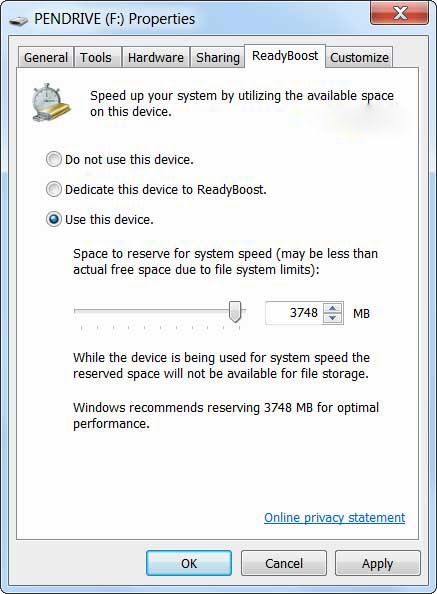
  • Select ‘Ready boost’.
  • Click “use this device”.
  • Now select the maximum space that  RAM can give to the computer.
  • Click ‘ok’ and ‘apply’.
This is how you can use your USB as RAM. This results in the improvement in performance of your PC.


Sunday, 27 October 2013

create shutdown shortcut for windows 8


1. It starts, ironically, in Desktop mode, which you can reach by clicking/tapping the Desktop tile or pressing Win-D (that's the Windows key and the letter D).
2. Right-click in any open spot on the desktop, then choose New, Shortcut.
3. We're going to make a Shutdown shortcut, so in the location field, type shutdown /p and then click Next.
4. Choose a different name for the shortcut if you want, or leave it as "shutdown," then clickFinish.
5. Right-click the new shortcut and choose Pin to Start.
Presto! You're done. The next time you return to the Start screen (aka Metro), you should see a Shutdown tile. One click or tap and your machine should immediately shut down.
You can also use this method to create a reboot tile. Just substitute the following text in step 3: shutdown /r /t 0. (That's a zero at the end, and you shouldn't include the period after it.)
Note that using the reboot tile will immediately reboot Windows, with no second-chance warning.
Note to Microsoft: While you're figuring out this whole Windows Blue thing, why not add a shutdown tile to the Start screen instead of forcing users to do it manually? I mean, seriously, what possible reason could you have for excluding it?

Monday, 8 July 2013

View and download locked profile pictures in large size ( FaceBook Trick)


Step 1: Go to www.facebook.com and sign in to Your Account.

Step 2 : Goto any locked Profile Of which You want to view Profile Picture in large size.

Step 3: Right Click on Profile Picture and Select Copy Image URL.

Step 4: Now Open a new Window in Your Browser and Paste that URL in Adress bar.


Your will Get some thing Like This:


 https://fbcdn-profile-a.akamaihd.net/hprofile-ak-prn2/c30.30.370.370/s160x160/252682_374628439268712_1231557763_n.jpg


Step 5: Now All You need to Do is Just Remove s160x160 From The Url That you copied and Press enter, Boom, Now you Can see Large size Image. 

OR

Replace s160x160 With s720x720 , this will do the Work for you Too.

Note: To Above image url is Just an example if You Remove s160x160 From the Above Url, The Image will Not enlarge because the Profile is not locked.

Keep visiting For more Tricks.


ANEESHVAKKOM

Saturday, 6 July 2013

How to format unformattable pendrives(also memory cards)


This post helps you to format unformattable pendrives.your pendrive becomes unformattable due to some virus attacks.this Trick helps you to format even unformattable pendrives(also memory cards).This trick is done with the help of command prompt.
Follow the given steps to do that

(backup important data in the device first)
(follow the only steps as given)
(plug in usb before doing this)


start>run>cmd

then type:

Format/x J:

(J refers to usb disk drive letter it may be different in your case so replace the letter)
then press enter

you are done !!!

How to disable writing to USB

ONLY FOR  windows

If you are the administrator of public cafe or school,this trick will be helpful for giving protection to your system.  You can disable writing to USB.  This will prevent from file stealing.

use the following steps to disable sharing to usb


!!! do this at your own risk !!!
!!! this trick only work in windows !!!
You have to login to administrator so that you can access regedit.

Go to start >>run.

Type as regedit and hit enter
Now navigate to
HKEY_LOCAL_MACHINE\SYSTEM\CurrentControlSet\Control\StorageDevicePolicies
 In right panel you can find writeprotect
Change the value to 00000001

That's all now no  one can transfer data to USB.  Now your system is protected.

 
- ,